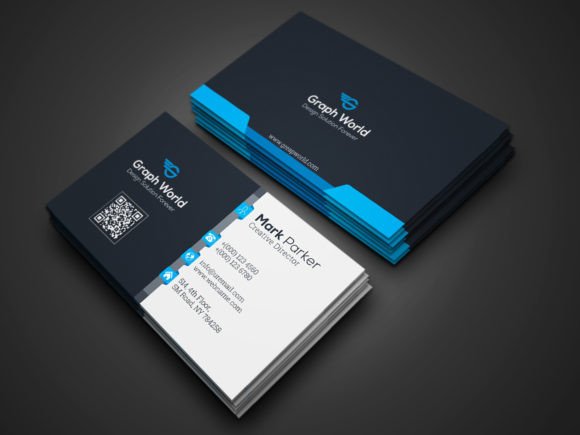
Business Cards: Essential Design Templates for Professional Branding
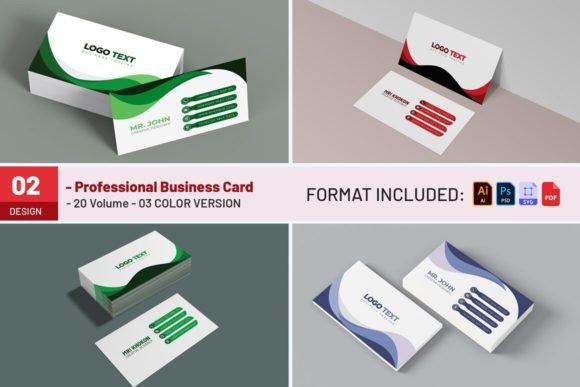
In an era dominated by digital communication and virtual networking, the tangible impact of a physical business card remains surprisingly potent. It is often the first physical representation of your brand that a potential client or partner holds in their hands. For professionals, creators, and business owners, having a high-quality, print-ready design is not just a formality; it is a strategic asset. This article explores the value of using professional Business Cards templates, specifically focusing on high-resolution, customizable PSD files that streamline the branding process.
The Enduring Value of Physical Networking Tools
While social media profiles and LinkedIn connections are essential, they lack the tactile memory associated with a well-crafted card. When you hand someone a Business Card, you are offering more than just contact information; you are providing a keepsake that reinforces your professional identity. The weight of the paper, the clarity of the typography, and the precision of the layout all contribute to the perceived quality of your services.
Using a pre-designed template, such as the one described in this guide, allows individuals to bypass the steep learning curve of graphic design while still achieving a polished, agency-level result. These templates are designed with the end-user in mind, ensuring that even those without extensive Adobe Photoshop experience can create stunning visuals.
Key Features of High-Quality Card Templates
When selecting a design resource, technical specifications are paramount. A superior template offers more than just aesthetic appeal; it provides the structural integrity needed for professional printing. The Business Cards template discussed here includes several critical features that ensure a seamless transition from screen to print:
- High Resolution: Designed in 300 DPI (Dots Per Inch), ensuring crisp text and sharp images without pixelation.
- Color Accuracy: Utilizes CMYK Color Mode, which is the standard for commercial printing, preventing color shifts between your monitor and the final product.
- Standard Dimensions: Adheres to the classic 3.5×2 inch dimension, making it compatible with standard card holders and wallets.
- Print Safety: Includes a 0.25 inch Bleed area, ensuring that background colors and images extend to the edge of the card after trimming, leaving no unwanted white borders.
- Customizability: All main elements are editable, allowing for easy integration of personal logos, taglines, and contact details.
Understanding the Technical Specifications
For those new to print design, terms like "bleed" and "CMYK" might seem daunting. However, understanding these concepts is crucial for achieving a professional outcome. The CMYK Color Mode refers to the four ink colors used in printing: Cyan, Magenta, Yellow, and Key (Black). Digital screens use RGB (Red, Green, Blue), which has a wider color gamut. By designing in CMYK from the start, you ensure that the vibrant colors you see on your screen are accurately reproduced on paper.
Similarly, the 0.25 inch Bleed is a safety margin. Printers cut stacks of cards in bulk, and slight variations in cutting are inevitable. The bleed ensures that if the cut is slightly off-center, your design still covers the entire card face. Without this, you risk having thin white lines along the edges, which can look unprofessional. This template’s inclusion of bleed settings demonstrates a commitment to print-ready standards.
File Structure and Ease of Use
One of the most significant advantages of this specific Business Cards package is its organized file structure. The download contains 08 PSD Files, providing a variety of layout options. This variety allows users to choose a design that best fits their industry—whether it’s a minimalist layout for a consultant or a bold, graphic-heavy design for a creative artist.
Additionally, the package includes:
- 01 Information File: Provides an overview of the template’s features and usage rights.
- 01 Read Me File: Offers step-by-step instructions for editing and exporting the files.
- Help Guide: Ensures that users can troubleshoot common issues or learn advanced customization techniques.
This comprehensive support system reduces the friction often associated with DIY design projects. Instead of spending hours figuring out layer masks or smart objects, users can focus on inputting their unique content.
Typography and Visual Identity
Typography plays a pivotal role in how a brand is perceived. The fonts chosen for a Business Card convey tone—seriousness, creativity, approachability, or luxury. This template utilizes two widely respected and highly readable fonts:
- Montserrat: A geometric sans-serif typeface that offers modernity and clarity. It is excellent for headers and names, providing a clean, contemporary look.
- Roboto Slab: A slab-serif font that combines the mechanical feel of slabs with the friendly curves of humanist sans-serifs. It is ideal for body text and contact details, ensuring legibility even at small sizes.
These fonts are not only aesthetically pleasing but also widely available, making it easy for users to install them if they are not already present in their system. The combination of Montserrat and Roboto Slab creates a balanced visual hierarchy, guiding the reader’s eye naturally from the name to the title, and finally to the contact information.
Practical Applications and Who Benefits
The versatility of this Business Cards template makes it suitable for a wide range of professionals. Here are a few scenarios where this resource proves invaluable:
Freelancers and Creatives
Graphic designers, photographers, and writers often need to showcase their style through their collateral. With Easy Customizable and Editable features, creatives can adjust colors to match their portfolio website or personal brand guidelines. The high-resolution output ensures that any logo or icon included remains sharp and professional.
Corporate Professionals
For executives, consultants, and sales representatives, consistency is key. Using a standardized template ensures that all team members have cards that look cohesive, reinforcing corporate identity. The Print Ready Format means that large batches can be sent to professional printers without the need for additional pre-press adjustments.
Small Business Owners
Startups and local businesses often operate with limited budgets. Investing in a high-quality template is a cost-effective alternative to hiring a design agency. The inclusion of a Help Guide empowers business owners to manage their own branding updates, such as changing a phone number or adding a new social media handle, without incurring extra costs.
Considerations and Limitations
While this template offers extensive flexibility, it is important to understand its limitations to manage expectations. Firstly, the Photos and mockup used in the preview are not included in the download. They are strictly for illustration purposes to show how the card might look in a real-world setting. Users interested in creating similar promotional images can purchase these assets from platforms like photodune.net.
Secondly, the template requires Adobe Photoshop CC. While this is industry-standard software, users who prefer free alternatives like GIMP or Canva may find the PSD format less accessible. However, for those with access to Photoshop, the layer-based editing capability offers unparalleled control over the design.
Finally, while the template is Easy Customizable, users should still have a basic understanding of design principles. Changing fonts or colors is straightforward, but maintaining balance and whitespace requires a keen eye. The provided Information File and Read Me File serve as excellent starting points for beginners.
Making the Most of Your Design
To maximize the impact of your Business Cards, consider the following tips when customizing the template:
- Keep it Simple: Avoid clutter. Use the whitespace effectively to let the information breathe.
- Proofread: Double-check all contact details, spelling, and punctuation before sending the file to print.
- Test Print: If possible, print a single copy on home equipment to check for alignment and color accuracy before committing to a large professional print run.
- Quality Paper: Remember that the design is only half the equation. The choice of paper stock (glossy, matte, textured) will significantly affect the final feel of the card.
Conclusion
In conclusion, a well-designed Business Card is a powerful tool for professional networking. This template, with its 300 dpi print-ready CMYK PSD files, offers a robust solution for anyone looking to elevate their personal or corporate branding. By combining technical precision with aesthetic flexibility, it empowers users to create cards that leave a lasting impression.
Whether you are a seasoned designer looking for a quick starting point or a business owner taking charge of your brand identity, this resource provides the necessary tools for success. If you encounter any challenges during the customization process, the creator encourages users to reach out via their profile for assistance. Furthermore, if you find the template helpful, taking a moment to rate the item supports the creator and helps other users discover this valuable resource. Thank you for investing in your professional presentation.