Elevating Romance: A Guide to Wedding Titles .Mogrt Premiere Pro
In the fast-paced world of digital content creation, particularly within the wedding and event videography niche, efficiency is just as critical as creativity. Clients expect cinematic quality, emotional resonance, and rapid turnaround times. For editors working in Adobe Premiere Pro, finding tools that bridge the gap between high-end design and workflow speed is essential. This is where Wedding Titles .Mogrt Premiere Pro enters the conversation. It is not merely a collection of text animations; it is a professional, elegant Essential Motion Graphics template designed specifically for premium and romantic video projects.
This article explores the practical applications, technical features, and strategic value of this motion graphics pack. Whether you are a seasoned professional editing a highlight reel or a hobbyist creating a keepsake for friends, understanding how these templates function can significantly enhance your final output.
The Role of Typography in Wedding Storytelling
Before diving into the technical specifications, it is important to understand why titles matter. In wedding films, text serves multiple narrative functions. It introduces the couple, establishes the location and date, and provides context for the viewer. More importantly, the style of the typography sets the emotional tone. A jagged, aggressive font clashes with the softness of a vow exchange, while a clean, smooth animation complements the gentle pacing of romantic media.
Wedding Titles .Mogrt Premiere Pro addresses this need by offering clean and smooth animations that integrate seamlessly into romantic narratives. The design philosophy here is minimalism and elegance. The titles are crafted to support the footage rather than distract from it, ensuring that the focus remains on the subjects—the bride, the groom, and their shared moments.
Key Features and Technical Capabilities
One of the primary advantages of using .mogrt (Motion Graphics Template) files is their flexibility within the Adobe ecosystem. This specific pack is engineered to be user-friendly while retaining professional-grade control. Below are the core features that define its utility:
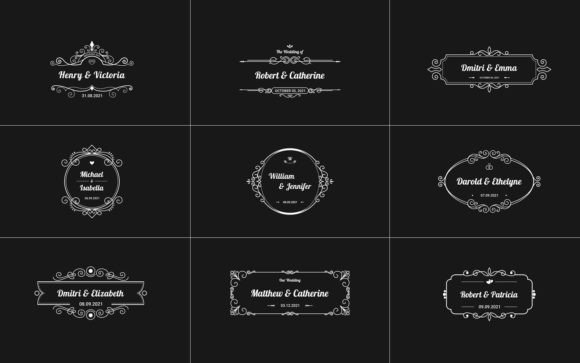
- Nine Clean Wedding Titles: The pack includes nine distinct title variations. This variety allows editors to maintain visual interest throughout a video without repetitive designs. These can serve as opening sequences, name introductions, or transitional elements.
- No Plug-ins Required: Perhaps the most significant benefit for many users is that this template requires no third-party plug-ins. It relies solely on native Premiere Pro capabilities, ensuring stability and ease of use across different machines.
- Color Controllers: Customization is key to matching brand identities or wedding themes. The included color controllers allow users to adjust hues quickly, ensuring the text complements the color grading of the footage.
- Universal Expressions and Modular Structures: The template uses universal expressions, meaning it is robust and less prone to errors when moved between different project files or computers. The modular structure allows for easy tweaking of individual elements without breaking the entire animation.
- Free Font Link Included: Typography consistency is crucial. The package includes links to the free fonts used in the design, removing the guesswork and ensuring the preview matches the final render.
Compatibility and System Requirements
To ensure smooth performance, it is vital to check software compatibility. Wedding Titles .Mogrt Premiere Pro works with Premiere Pro CC 2021 and above. This requirement ensures that users have access to the latest rendering engines and expression updates necessary for the template’s complex animations. It is always recommended to keep your Creative Cloud applications updated to avoid potential conflicts with newer motion graphic standards.
Practical Applications in Video Production
The versatility of this motion titles pack extends beyond traditional wedding ceremonies. Because it is designed as a multi-purpose animated tool for romantic media, it can be adapted for various scenarios. Here are some real-world applications where these titles add significant value:
- Opening Sequences: The first few seconds of a wedding film are critical for hooking the audience. Using one of the elegant title cards to introduce the couple’s names alongside the date creates an immediate sense of occasion and professionalism.
- Lower Thirds for Interviews: Many modern wedding videos include soundbites from the bride, groom, or family members. The lower third options in this pack provide a subtle, non-intrusive way to identify speakers, maintaining the cinematic feel of the interview segment.
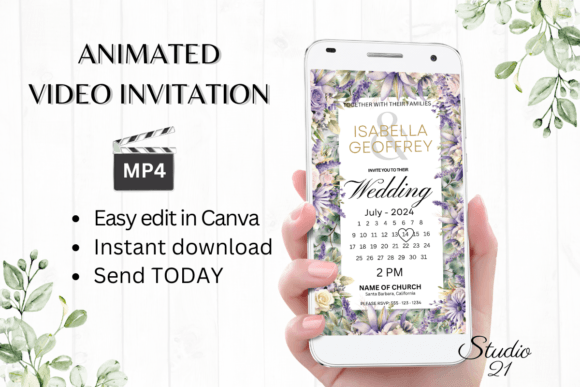
- Digital Invitations: With the rise of social media, couples often share digital save-the-dates or invitation videos. The clean animations work perfectly for these short-form clips, providing all necessary details in a visually appealing format.
- Chapter Markers: For longer documentary-style edits, titles can serve as chapter markers, separating the preparation phase, the ceremony, and the reception. This helps structure the narrative and guides the viewer through the day’s timeline.
Workflow Efficiency: Saving Time Without Sacrificing Quality
For professional videographers, time is money. Manually animating text layers, keyframing opacity, and adjusting easing curves for every single title can consume hours of post-production time. Wedding Titles .Mogrt Premiere Pro streamlines this process through its project control panel.
The inclusion of a Video Tutorial is a notable feature that enhances this efficiency. Rather than spending time troubleshooting or guessing how parameters interact, users can follow the guide to customize the template faster. The tutorial likely covers how to swap text, adjust durations, and modify colors, allowing even novice editors to achieve professional results quickly. By reducing the technical friction of title creation, editors can focus more on storytelling, color grading, and audio mixing—areas that often have a greater impact on the final emotional response of the viewer.
Evaluating Suitability: Is This Pack Right for You?
While Wedding Titles .Mogrt Premiere Pro offers numerous benefits, it is important to evaluate whether it fits your specific project needs. Consider the following factors:
Aesthetic Alignment
The pack is described as "clean," "smooth," and "elegant." If your project requires bold, grunge, or high-energy kinetic typography, this may not be the ideal choice. However, for classic, romantic, minimalist, or luxury wedding styles, it aligns perfectly. Always review the preview images to ensure the animation speed and font choices match the mood of your footage.
Technical Proficiency
Although no plug-ins are required, users should still possess a basic understanding of the Essential Graphics panel in Premiere Pro. The "modular structures" imply that while the template is pre-built, understanding how to navigate nested compositions or effect controls will help you maximize its potential. The included tutorial mitigates this learning curve, but a baseline familiarity with Premiere Pro is assumed.
Content Limitations
It is crucial to note what is not included. Music and preview images are excluded from the package. This is standard for motion graphic templates, but new users should be aware that they must source their own background footage and audio tracks. The template is a vessel for your content, not a complete video solution in itself.
Best Practices for Implementation
To get the most out of Wedding Titles .Mogrt Premiere Pro, consider these best practices during your editing process:
Match the Pace: Ensure the duration of the title animation matches the rhythm of your music and cuts. A slow-fading title may feel disjointed if placed over a fast-paced montage. Use the control panel to adjust timing if necessary.
Contrast is Key: Even with color controllers, readability is paramount. Ensure there is sufficient contrast between the text and the background footage. If the background is busy, consider adding a subtle overlay or blur behind the title to enhance legibility.
Consistency: Stick to one or two title styles from the pack throughout a single video. Switching between too many different animations can make the edit feel cluttered and unprofessional. Consistency reinforces the brand identity of the video and provides a cohesive viewing experience.
Conclusion
In conclusion, Wedding Titles .Mogrt Premiere Pro represents a valuable asset for video creators seeking to elevate their romantic media projects. By combining elegant design with practical functionality, it addresses the dual needs of aesthetic quality and workflow efficiency. The absence of required plug-ins, coupled with comprehensive color controls and a helpful video tutorial, makes it accessible to a wide range of users, from beginners to seasoned professionals.
Ultimately, the goal of any wedding video is to evoke emotion and preserve memories. Tools like this motion graphics pack serve as silent partners in that mission, ensuring that the presentation is as polished and heartfelt as the moments being captured. For those looking to streamline their editing process while delivering a premium look, exploring this template is a logical and beneficial next step. Get it Now to start transforming your raw footage into timeless stories.